
$2,739.41
Add to Cart
Engineering Laptop Ready Panasonic Toughbook CF-54 SCREEN 14"PLC & HMI Work WOC3
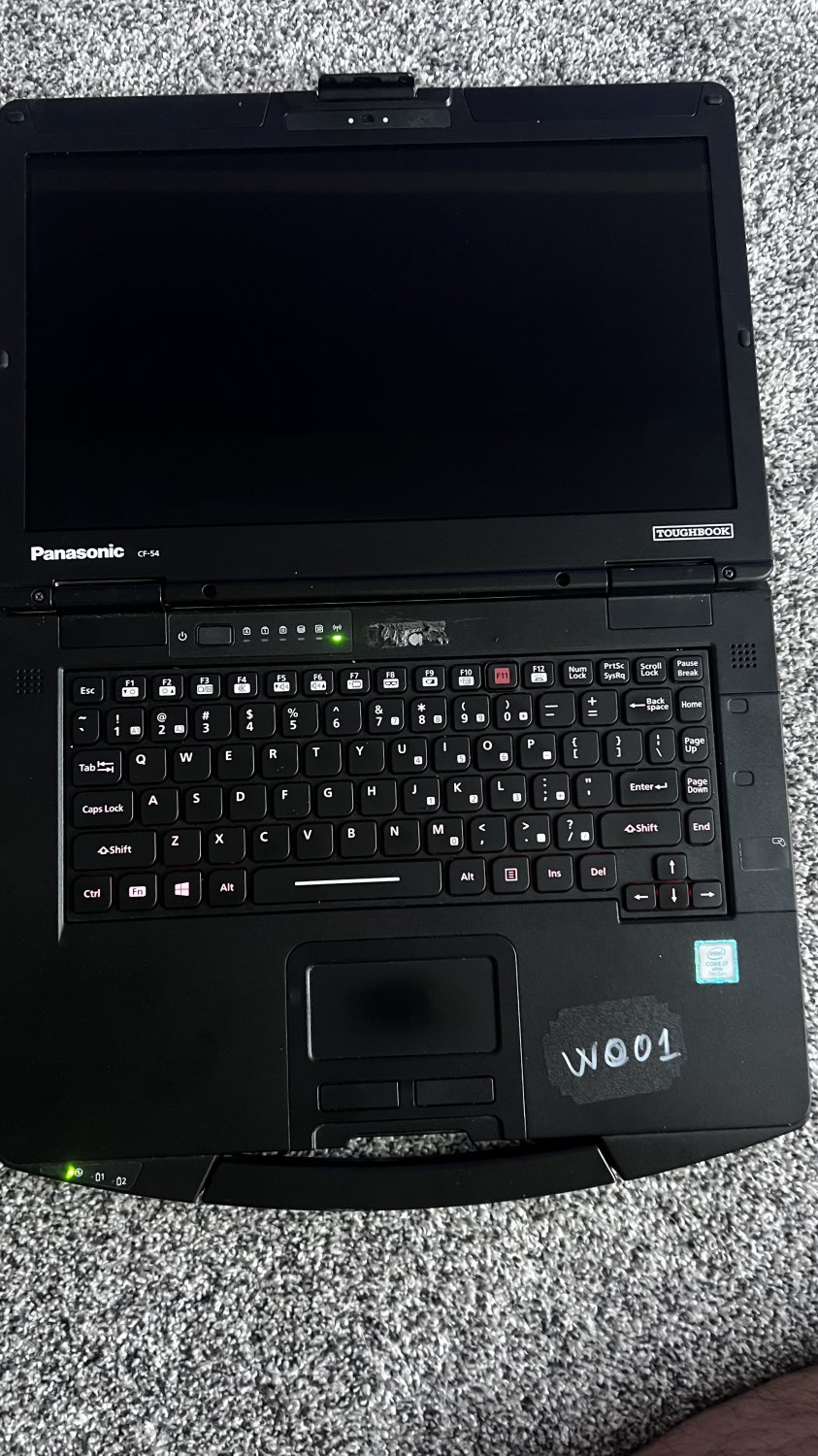


Pre-Configured Engineering Laptop –
Ready for PLC & HMI Work
Built, tested, and delivered with vendor drivers, and comms utilities—so you can connect to
Siemens, Rockwell, Mitsubishi and more on day one.
Panasonic Toughbook CF-54 SCREEN 14" SCREEN WOC01
CPU Intel Core i7 @ 2.60GHz ; Ram 32GB DDR4 Dual-Channel
Storage 1TB SSD Windows 11
Operating System Panasonic Toughbook CF-54 MK3 15.6-inch SCREEN WOC03
Windows 11 Pro 64-bit
CPU CPU
Intel Core i7 @ 2.6GHz
Max Turbo Frequency. 3.9 GHz
Technology
RAM RAM
32.0GB DDR4
Motherboard Motherboard
%1 Chipset
Graphics
Display 1920x1080 (1920x1080@60Hz)
Intel HD Graphics 620
Storage
Storage 1TB (RAID (SSD))
Audio
Realtek Audio
MORE DETAILS
MORE DETAILS https://drive.google.com/drive/folders/19caQwnJxu_puUR0sHze9ETdREHyFqUjv?usp=drive_link
Please see below the Full list of programs installed and activated for this laptop.
The laptop is equipped with various automation and programming software for PLC (Programmable Logic Controller) and HMI (Human-Machine Interface) systems.In addition to PLC programming, the laptop is capable of programming, uploading, and downloading to various PLC models.
Whether you're expanding your current toolkit or upgrading to a faster, more capable system, this laptop is designed to make your work more efficient. All programs are permanently activated, ensuring you never have to worry about renewals or expiring licenses.
PLC Programming Tools: RSLogix 5, RSLogix 500, RSLogix 5000, Studio 5000 Logix Designer, TIA Portal, PAC Machine Edition, FactoryTalk View Studio.
Simulation & Diagnostics: RSLogix Emulate 500, FactoryTalk View Machine Edition Station, WinCC Flexible 2008, Unity Pro, Vijeo Designer.
Design & Visualization: AutoCAD (Electrical, Mechanical), Autodesk Revit,Solidworks, EPLAN Electric P8 Pro Panel, FactoryTalk ViewPoint SE & ME.
Furthermore, the laptop supports design software from different brands and includes software for simulation and visualization purposes.
Ready for PLC & HMI Work
Built, tested, and delivered with vendor drivers, and comms utilities—so you can connect to
Siemens, Rockwell, Mitsubishi and more on day one.
Panasonic Toughbook CF-54 SCREEN 14" SCREEN WOC01
CPU Intel Core i7 @ 2.60GHz ; Ram 32GB DDR4 Dual-Channel
Storage 1TB SSD Windows 11
Operating System Panasonic Toughbook CF-54 MK3 15.6-inch SCREEN WOC03
Windows 11 Pro 64-bit
CPU CPU
Intel Core i7 @ 2.6GHz
Max Turbo Frequency. 3.9 GHz
Technology
RAM RAM
32.0GB DDR4
Motherboard Motherboard
%1 Chipset
Graphics
Display 1920x1080 (1920x1080@60Hz)
Intel HD Graphics 620
Storage
Storage 1TB (RAID (SSD))
Audio
Realtek Audio
MORE DETAILS
MORE DETAILS https://drive.google.com/drive/folders/19caQwnJxu_puUR0sHze9ETdREHyFqUjv?usp=drive_link
Please see below the Full list of programs installed and activated for this laptop.
The laptop is equipped with various automation and programming software for PLC (Programmable Logic Controller) and HMI (Human-Machine Interface) systems.In addition to PLC programming, the laptop is capable of programming, uploading, and downloading to various PLC models.
Whether you're expanding your current toolkit or upgrading to a faster, more capable system, this laptop is designed to make your work more efficient. All programs are permanently activated, ensuring you never have to worry about renewals or expiring licenses.
PLC Programming Tools: RSLogix 5, RSLogix 500, RSLogix 5000, Studio 5000 Logix Designer, TIA Portal, PAC Machine Edition, FactoryTalk View Studio.
Simulation & Diagnostics: RSLogix Emulate 500, FactoryTalk View Machine Edition Station, WinCC Flexible 2008, Unity Pro, Vijeo Designer.
Design & Visualization: AutoCAD (Electrical, Mechanical), Autodesk Revit,Solidworks, EPLAN Electric P8 Pro Panel, FactoryTalk ViewPoint SE & ME.
Furthermore, the laptop supports design software from different brands and includes software for simulation and visualization purposes.
Other Products from mikebaker (View All)
-
$1,090.45
-
$1,385.33
-
$1,033.91
-
$866.34
-
$574.87
-
$587.45
-
$329.58
-
$259.61
-
$308.72

-
$47.26


